Forum Replies Created
-
AuthorPosts
-
Hi!
No, I couldn’t reproduce the bug itself yet.
All of my test uploads were correct. (We wouldn’t have launched the shop, when we had noticed corrupt image uploads)Maybe it has something to do with Browsers? Or Tablets/Smartphones?
I’ve asked I client (with an uploaded corrupt photo), from what platform he made the upload. He said it was Windows, Browser Edge.
He sent me the same photo via email and it was not corrupt.I can make a test, whether it’s caused by the Edge brwoser – but I can’t really believe it…
Do you have any idea?
and again – next order:#shop-maske-130
–> Uploaded photo corrupt…
https://shop.fotobox-team.de/wp-content/uploads/wcdu_upload/e37e4f9491fa6d612dc978cb75fe3ac2/6020555641bf234232addf800f206c33/kaethe_6_1228hr.jpgDo you have an idea, what this can cause?
🙁-
This reply was modified 5 years, 10 months ago by
pfirsiche.
Hi Borisol,
please take a look for example at the order number “shop-maske-105. This order came in yesterday a long time after I updated the plugin.
The uploaded picture in this order is corrupt and cannot be opened.It’s true, there are a lot of orders, where the upload works perfect, but unfortunately there are still too many orders with corrupt pictures…
Hi Borisol,
unfortunately the problem still exists.
A few seconds ago, an order came in and the uploaded picture is corrupt, as you can see here:
https://shop.fotobox-team.de/wp-content/uploads/wcdu_upload/e5d29b6479ea20daacfc4d88b4f235bd/edbccf05e5347b4bd330997e339a8a5b/16050194019267110350612452659040.jpgI’ve installed your update of WCDU 1.2.6 but it seems, that it has no effect 🙁
Update: Now our last 3 orders all came with the corrupt images…
-
This reply was modified 5 years, 10 months ago by
Hi Borisol,
the problem still remains in our shop, as you can see here:
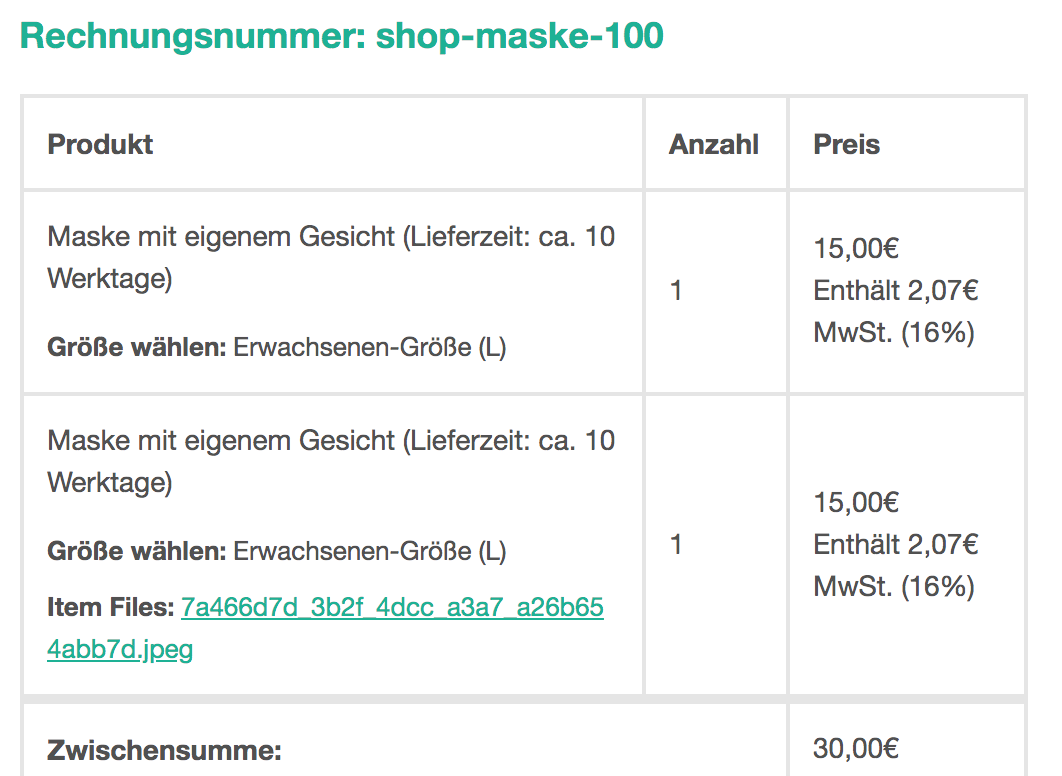
https://shop.fotobox-team.de/wcfuscreenshot.png–> Case: Customer ordered the same product twice, has uploaded the same picture for both products, but it’s only one link to the picture
P.S.: It’s not possible to upload pictures with the uploader here in the forum – all filetypes seem to be not supported…
Thank you very much!
I’ve installed the update and will give you feedback!Thanks for the fast support!
That would be great
Do you think you can bring it with your next update?
And can you estimate when the next update will come?Perfect, thank You!
Hmm…okay, I will work with the CSS-fix.
But please let me know, as soon as you have fixed this issue.Hi,
now I disabled the css solution.
Now you can see that the second uploader appears, after selecting a size.
Setting: DropUploader “After short desc”-
This reply was modified 5 years, 11 months ago by
Yes I will – give me some time, it’s very busy here.
I will write you in some days.
Thanks so far!Hi!
Yes, I made a quick&dirty solution via css:.woocommerce-variation-description {
display: none;
}But it’s not a good solution. The question is, WHY does the variation-description appear with the second uploader-element
-
This reply was modified 5 years, 10 months ago by
-
AuthorPosts